ThePPInsider is an independent mobile app comparison platform. We may earn a commission when you click through.
Photo Restoration Apps That Fix More Than Blur
Compare 10 restoration apps by repair tools, colorization, ratings, platform limits, and the difference between recovering files and repairing images.
Photo restoration apps make a bold promise: turn damaged memories into usable images with one tap. The reality is narrower. AI can sharpen edges, reduce visible damage, add plausible color, and enlarge a small portrait, but it cannot recover detail that was never captured. A blurry face may become clearer; it may also acquire invented eyes, hair, or skin texture.
The first mistake is confusing photo restoration with file recovery. A deleted JPEG and a faded family portrait need different tools. The second is trusting a five-star score based on one or two ratings. In this group, Pixelup has 70 App Store ratings, while several rivals have only one or two.
Start with the damage, not the app name. Use the Android options for broader access, and remember that the iPhone listings below are marked as iPhone-only unless stated otherwise.
Repair, sharpen, and colorize: the main restoration tools
Most restoration apps combine three jobs: repairing visible damage, improving clarity, and colorizing monochrome images. That sounds similar across the category, but the balance matters. A portrait that needs scratch reduction is a different assignment from a low-resolution image that needs enlargement.
AI Photo Restore
jpgHD covers the widest restoration brief in the supplied group: it reduces visible scratches, colorizes black-and-white images, enhances blurry photos, reduces noise, and upscales portraits, landscapes, illustrations, and artwork. That range earns it the lead position, although the listing supplies no price, rating, or privacy details, so the practical cost remains unknown. I would start here on Android for a damaged family photograph, then inspect the result at full size rather than trusting the thumbnail. The AI may improve contrast and edges, but its color choices are interpretations, not historical evidence.

Photo Enhancer AI
Photo Enhancer AI takes a narrower route than jpgHD, focusing on blurry old photos and image-quality improvement through AI processing. Its description is useful but incomplete: no rating, price, platform detail, or export limitation is provided. That makes it harder to recommend for a large restoration project, yet the simpler brief may suit someone who only wants to test whether a soft scan can be sharpened. Compared with jpgHD, it offers less evidence of scratch repair or colorization, so it should not be the first pick for heavily damaged monochrome prints.

Old Photo Restore
Old Photo Restore: Clear Blur is an iPhone-only app with a direct promise: repair and enhance image quality. The App Store page lists it as free with in-app purchases and shows a 5.0 rating from just one rating. That score is too small to treat as proof of reliability, but the focused name makes the intended use obvious. Pick it for a quick blur experiment on an iPhone, not for a full archive workflow where you need tested batch handling, transparent pricing, or a substantial review history.

Photo Restore AI
Photo Restore AI: Revive Old is another iPhone-only listing built around fixing, colorizing, and repairing photos. It is free to install with in-app purchases, but the supplied App Store data does not show a rating or enough detail about the paid tier. The colorization claim gives it a broader purpose than a basic blur fixer, yet there is no evidence here of scratch reduction, upscale limits, or export quality. It belongs on a shortlist for casual testing, especially if color is the main goal, but jpgHD remains the more clearly documented Android pick.
Oldfix
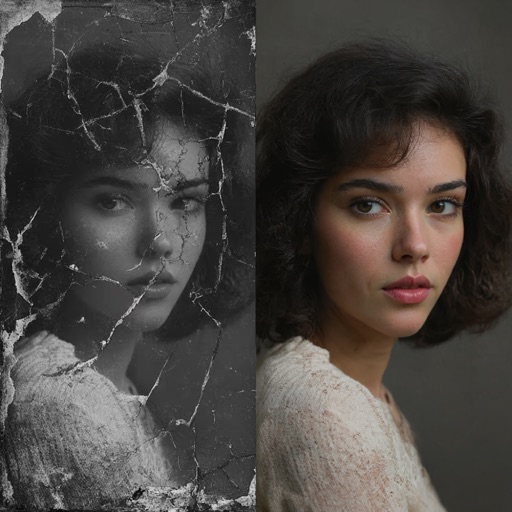
Oldfix is a free iPhone app with in-app purchases and a 5.0 score from two ratings. Its title and listing point squarely at old-photo repair, but the available page content does not specify whether it colorizes, upscales, removes scratches, or handles batch work. That missing detail matters more than the perfect score. Use it when you want a lightweight experiment and can compare the before-and-after yourself; skip it as a serious archive tool until its feature and export limits are clearer.

Photo Restore
Photo Restore: Clear Picture has a 4.8 rating from six App Store ratings, is free with in-app purchases, and is limited to iPhone. Its stated focus is AI enhancement and clearing old photos, which places it between a general enhancer and a dedicated restoration tool. The rating is more informative than a single five-star review, but six ratings still cannot establish consistent results across faces, landscapes, and damaged scans. I would test this against Oldfix on the same image and keep whichever preserves facial structure with fewer artificial details.

AI Picture Restore
FixMyPics has the clearest three-part workflow in this iPhone group: scan old photos, fix them, and add color. It is free with in-app purchases and carries a 4.8 rating from six ratings. That feature sequence makes more sense for family albums than a pure blur enhancer because scanning and colorization are part of the same stated task. The limitation is evidence: six ratings are still a small sample, and the listing does not reveal subscription terms or output resolution. Choose it when color and cleanup matter together, not when you need documented archival controls.

The iPhone cluster is appealing but lightly tested by public ratings. Pixelup is the exception, with 70 ratings, while most of the dedicated restoration apps sit between one and six. That makes feature matching more useful than star chasing. A single five-star score can describe one successful portrait; it cannot tell you how the app handles a scratched group photo.
There is also a practical distinction between restoring and recovering. The next group includes one app whose main job is finding deleted files, plus two tools aimed at turning restored images into shareable memories.
When the problem is the file, the format, or the final presentation
These apps are related to photo restoration but solve different problems. One searches for deleted files; the others add music, video, or enhancement around a family image. That distinction prevents the most expensive mistake in this category: using an image enhancer on a file that is no longer on the device.
Photo Restore
Photo Restore - Video & File should not be confused with the repair apps above. Its description says it scans for accidentally deleted photos, including JPEG and PNG files, and can also search for deleted videos and other files. That makes it a recovery utility, not a tool for repairing faded paper scans or adding color. Use it immediately after accidental deletion, before filling the device with new data; choose jpgHD or FixMyPics for an image that still exists but looks damaged. The listing does not provide a rating, price, or recovery success rate, so “attempt to recover” is the honest expectation.

AI Photo Restore
AI Photo Restore With Music adds a presentation layer that the dedicated repair tools do not: it can enhance blurry images, upscale resolution, restore old family photos, add background music, and turn photos into memory videos. That makes it a better fit for a slideshow or tribute than for careful archival work. The description does not give a rating, price, export resolution, or music licensing information, so the final video may be more useful for sharing than preserving. Start with a clean restored still, then decide if the music feature adds meaning or just distracts from the photograph.